

Blog Analytics Made Easy
Blog analytics is easier than you think if you just stick to the basics.
And, if you use the right tools to help you along.
Now, I’m not going to try to tell you that I’m any kind of analytics geek – because I certainly am not.
I actually stayed away from applying standard analytics for bloggers for a long time because I assumed it would be difficult.
I finally came to realize, though, that I really needed to know a little bit about what’s going on “under the hood” of my blog, not because I’m so interested in analyzing numbers.
But because I needed to know what was working and what was not working.
I needed to know where my blog was failing.
I wanted to know where I’m getting traffic from.
And I wanted to understand more about my target audience.
These are not just questions asked out of curiosity.
And the answers will help direct the course of your blogging business.
Special: Start Your New Blog Today… 3 Easy Steps
Blog Analytics Tools
In order to understand what’s really going on with your blog, you need to use some kind of tool.
There are many different analytic tools that you can use.
I personally use Google Analytics and find it to be pretty straightforward and simple.
And it’s a free tool, so there’s no reason to go on and about, stalling and shilly-shallying.
Just sign in, and start getting some insights into your blogging business.
3 Things I Analyze With Google Analytics
The three things that I have found most important to analyze, given my particular business model, are these.
- How many visitors I get.
- Where my traffic is coming from.
- What my bounce rate is.
Here’s How I Do My Blog Analysis (simple and easy)
1. Number of Visitors
In Google Analytics, “visits” are known as “sessions.”
This is important because you need to know how much traffic your blog is getting.
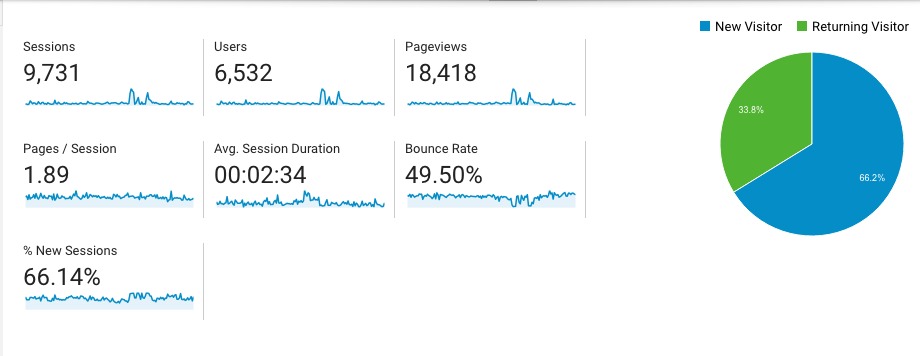
Traffic is called Sessions in Google Analytics
How Much Traffic Are You Getting?

Do You Have Joint Venture Partners?
Not only is it important because you want to know how much traffic you are getting, but you want to pass that information on to potential Joint Venture partners.
Have you ever thought of getting someone to work with you in your blogging business?
Have you ever considered reaching out to JV’s who can help you with specific aspects of your business?
You might decide to ask people to advertise on your site, write a guest post, do reviews for you, interviews or anything else that might help the popularity and ranking of your site.
People generally don’t want to do too much in terms of joint ventures with you, or guest spots on your blog… until you can show them the amount of traffic you are getting.
A decent amount of traffic can open many doors.
But without having some analytics in place, it’s difficult to show people the benefit of running a joint venture with you, or joining you in some sort of partnership enterprise.
Analytics For Bloggers
Blog analysis can tell you a lot about your market as well as your audience and traffic flow.
I like to check how particular pages or blog posts are doing compared with one other.
This gives me an idea of which topics are most important.
The value of this type of blogger tracking is that it helps me to write topics that my readers are interested in.
If I see everybody rushing to a blog post about email marketing, and hardly anybody is reading my blog post about video marketing, then I have learned how to analyze a blog in a critical way.
I have learned that my audience is more interested in email marketing than video marketing.
Special: Start Your New Blog Today… 3 Easy Steps
Blog analysis of this sort is a great way to do internal market research.
And it’s very simple and very easy.
Now, if I can tell you it’s simple and easy… believe me… it is 🙂
TIP: Here’s An Easy To Follow Guide To Getting Google Analytics Set Up On Your Blog
2. Traffic Sources
It should be obvious that knowing where your traffic is coming from is valuable.
If you don’t know how to analyze a blog properly, you will never know how traffic is getting referred to you.
Traffic source data is a key goal of blog analysis.
Here’s why.
First of all you see who is promoting you.
This will tell you what blog sites or social media platforms are important to foster interaction with.
Here are key social media sites that send lots of traffic my way, according to my blogging analysis.
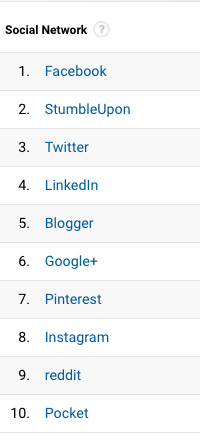
Here are a few blogs and websites that refer a ton of traffic to me.
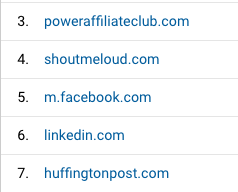
This kind of blog analysis reveals “Acquisition” sources.
That’s the Google Analytics term for what I call “traffic” traffic sources.
Here’s a Blog Analysis Example
Let’s take a look at how blog tracking tools can help you better understand your business.
If I’m spending all kinds of time on Reddit but nobody is coming to my blog from there, then I’m probably wasting my time with it.
So, I can just stop using that social site.
Or, understanding the implications of blog analytics like these, I may decide to rethink my Reddit strategy.
There are things I might do on Reddit that actually can help drive more traffic to my blog.
But if I was not doing this kind of blog analysis, I would never have known that.
Meanwhile, I may be doing very little on Twitter.
My blog analytics could reveal, though, that lots of people are coming from Twitter anyway.
So maybe I’m just better off to work my business through Twitter instead of Reddit.
This is just an example, of course, of how to analyze a blog properly.
Special: Start Your New Blog Today… 3 Easy Steps
But it’s the sort of thing that you can learn by using some basic blog analytics tools.
If you see a lot of traffic coming from a certain blog post or authority site, it might be a good tip-off that you want to do some to connect and interact with those sites.
Maybe you want to put a banner ad on those sites.
Or you might want to guest post on their site or even ask their owners to guest post on your site.
The fact that you see a lot of traffic coming from their site shows that their crowd is interested in what you’re doing.
So it’s just good business to do more of it.
This is the whole point of implementing the habit to do blog analysis on a regular basis.
3. Bounce Rate
Tracking your “bounce rate” is really important because it tells you if people are leaving your blog right away, without really reading it.
If that’s happening, then you’re doing something wrong.
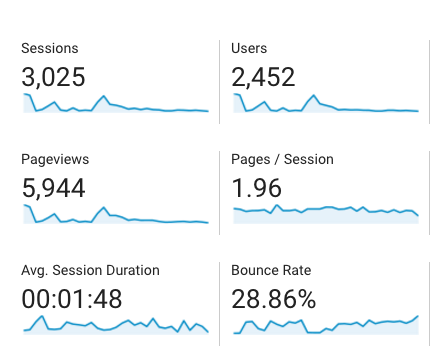
This Shows A 28.86% Bounce Rate
Internal Links
Maybe you need to put internal links to other articles in the first part of your blog post.
This gives people a chance to visit other pages on your blog, and start to draw them deeper into your blog content.
Blog Post Introductions
Perhaps you simply need to come up with a more interesting and compelling first paragraph.
You might have been saving the best for last, when really, it would help you out if you put your best foot forward, right off the bat.
That keeps your readers from “bouncing” over to another site.
Promises, Promises
You could even put some bold promises the first paragraph.
Say things like “you are going to learn 5 amazing things in this blog article about _____.”
Or, try this…
Special: Start Your New Blog Today… 3 Easy Steps
“By the time you’re done reading this post, you are going to know ____ ” (list things, like, a, b and c).
Now you wouldn’t know that is important to do this unless you were doing your blog analysis and seeing that your bounce rate is getting too high.
Use your blog tracking tools to inspire you to use some of new strategies.
You can then backtrack and see if it made a difference.
If it did, you’re on the right path.
If not, let your continuing blog analysis point you to some different strategies.
Blog Analytics Is Easier Than You Think
So I told you that doing blog analytics would be easier than you think.
And, what I just showed you that I do with Google Analytics is pretty much all I do.
There certainly are more advanced analytics you could be using.
But I think it’s a good idea to stick to the kind of basics I just described, if you’re just beginning to use blog analysis tools for the first time.
When you’re ready… Here’s The Best Beginners Guide To Google Analytics that I’ve found.
It is certainly a great and in-depth guide to pretty much anything you’d ever want to know about running Google Analytics on your blog.
So I hope that by seeing what I do with my blog analysis inspires you to start using Google analytics or one of the other tools out there. They can help you start getting a much better idea of what your blog is doing and how to run your blogging business.
I especially hope that you agree with me that… it really is easier than you think.

So, I’ve gone on and on, here, and it’s probably time for you to just start implementing some of these things.
Now, I’d like to hear from you.
Do you use any blog analysis tools?
Or do you just wing it? … like I did for so long… for too long, really.
If you use some blog analytics tools that I didn’t mention here, I’d certainly like to hear about it.
And what do you say…
Have I convinced you that Blog Analytics Is Easier Than You Think?
Don’t just read and run… give me your thoughts in the comment section below and, when you’re done with that… share this article on your favorite social sites.
Thanks much 🙂
-Donna


Comments are closed.