
 The Importance of Taking Action in Sales When a Lead Shows Interest is that if you don’t, your competitor will.
Today’s guest author, Zal Dastur, is an expert at converting leads into sales.
Now, you and I both know that it takes a lot of work to get people to our blogs and websites.
Sometimes, we even spend a lot of money on Facebook ads or other PPC to accomplish this.
But what good does it do if you don’t get conversions?
By that I mean, converting visitors into paying customers and clients.
Sure, you can convert them to subscribers for you email list.
But that requires them to then open your emails.
It requires that your emails do a great job at making offers that are irresistible.
Yada yada… at the end of the day… it still requires that at some point they convert into buyers and paying clients.
The hoops we have to jump through, right?
So why not short-circuit the whole process by getting those conversions right on your blog or website?
And do it right when people are most interested in what you’ve got from them.
How do you do that, though.
Ah, yes, it all sounds nice…
But how do you do it?
Special: FREE Guide… 4 Things I Did To Build My Blog Using Only Free Traffic
You’ll get some real great insights from my special guest into exactly how this can work for your business.
FYI, this is not a sponsored post, and there are no affiliate links here.
In other words, I’ve got no horse in the race 🙂
Just some really cool info on converting leads on your site that I asked Zal to share here, because I thought it could help you improve your business.
The Importance of Taking Action in Sales When a Lead Shows Interest
by Zal Dastur
You can build a crack sales team and spend huge sums on innovative marketing campaigns to generate interest and reach your target audience.
But all that will get you is more clicks and a small percentage of people who want to contact you.
The key to increasing sales is to take action when a lead shows interest.
One way to do this is to start talking to your site visitors.
Consider this – You kick off a search engine marketing (SEM) campaign to attract traffic for your top keywords.
You’re told it’s going to cost you between $2-3 per click (that was the average CPC last year for pay per click campaigns on Adwords).
Now you start getting around 50 paid clicks per day, and let’s say it’s costing you $2 per click, which means you’re spending $100 per day.
It’s highly targeted traffic from a search engine, so you’re getting good engagement on the site (low bounce rate, more page views, higher session durations, etc.).
But less than 5 of them end up buying online from you.
That’s on par with website conversion rates, which can vary from 1% to 10% depending on the product/service you are selling, and the industry you are in.
For example, a financial services niche site may get 10% conversions.
But a news blog selling online and print subscriptions to their magazine will be lucky to get 1% conversions.
The situation is further complicated if your product is a low-cost one (less than $10 – again fairly common for online sales).
So what we have here is that you got a maximum of 5 customers who paid $10 each, adding up to $50 in new sales revenue.
Since you spent $100 to acquire these 2 customers, you are effectively generating a loss of $50 per day.
At this point, I’d like to note that PPC can be a highly profitable channel for website marketing, once you go through the initial test and trial phase.
And once you find, I might add, the keywords and site optimization (we’re coming to that) required to generate more revenue than what you’re shelling out to get the clicks.
More Conversions vs More Traffic – Which is Better?
In an ideal world, you’d be able to get lots of traffic and everyone who visited your site would buy from you.
But it doesn’t work that way.
Special: FREE Guide… 4 Things I Did To Build My Blog Using Only Free Traffic
You have to spend a lot of resources on getting traffic to the site.
And you’ll probably have little interest in spending any more to convert visitors once they’re on your site.
So you see, you really can get targeted traffic from any one of a number of sources.
It may be PPC or SEO, email marketing, social media, or most likely a combination of all these.
I’m sure you work hard on getting this traffic, and probably spend a lot (either time or money… or both) every month for this.
What you don’t spend anything on is connecting to the people who land on your site to convince them to buy.
Am I right?
On average, businesses spend $95 getting people to their site for every $1 spent for converting people who are already on the site.
The result is that you end up losing around 90-95% of your site visitors who come and browse, but don’t contact you or buy anything.
Now how can you rectify this?
One good way to do it is by using marketing automation and sales tools to engage visitors while they’re on your website.
Sales Tools to Move Site Visitors Offline
The conversion rate stinks when you let your visitors decide what they want to do based on whatever information is available on the site.
But if you find a way to move them offline and talk to them, you’ll suddenly see a jump in the conversion rate and leads being generated from your site.
You see, your typical site visitor won’t take the trouble to click through to a contact page, find your number, and give you a call.
In a real brick and mortar shop, the only way you get to speak to your customers is if they drop in or give you a call.
Let’s just focus on the first set who have dropped in.
What you do is engage them – welcome them, ask them what they are looking for, and find a product that fulfills their need.
So why can’t you do the same thing on your website?
Your website visitors have dropped in, and now it’s your turn to greet them and ask them how you can assist them.
Do that, and you’ll see your conversions going through the roof.
Now how can you greet your website visitors and help them through the buying process?
This is where you need some kind of automation on your site to say “Hello, I’m here if you need any help or want to speak to me.”
That something, in technical or website terminology, is a “click to call” tool.
What is Click to Call?
The way it works is that you provide a widget on all your pages where people can just enter their name and number and hit submit to talk to you.
 They don’t have to take the trouble to click through to your contact page, find your number and then call you.
Most visitors won’t do that.
But if they see a “Want to talk?” option on the page they are on now, many more will use it.
You get to talk to your customers at the exact moment that they want to reach you.
The leads generated from the site will therefore go up sharply once you install a click to call tool.
It’s one of the ways that technology is helping businesses imitate the advantages of physical sales for their online prospects and buyers.
This is especially important today for engaging mobile visitors.
Tapping on a click to call button is so easy for someone who is accessing your site from a mobile device.
It’s fast and easy to implement, and will help more site visitors talk to you with just one tap.
Most click to call providers will offer you a free trial so you can test to see if it actually helps you get more leads and sales.
How Does Click to Call Back Work?
A further refinement of the click to call concept is to add a callback feature.
The problem with click to call is that you have to be available to pick up the phone every single minute of the day or night, any time a customer calls from any part of the world.
If you’re a small business with set timings, this is not physically possible.
 So does this mean you lose all the calls that you missed?
Not necessarily.
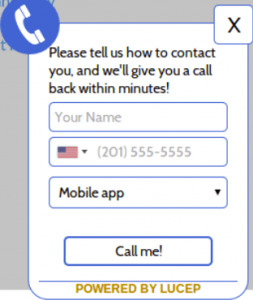
You can add a callback feature that lets you call back site visitors who want to talk to you.
It’s the same concept – someone enters their number and taps to send you a notification on your smartphone.
You have the option of accepting it at your convenience.
Whenever you do want to talk, the tool will patch you through directly to the caller.
Your site visitors don’t have to call you, and you don’t have to call anyone either.
The tool handles all that.
The only human interaction required is for the website visitor to request a callback, and for you to accept that notification.
Do this, and you’ll be talking to your site visitors.
Why Instant Response to Callback Works
This is where we get to the part about the importance of taking action at the right time… the moment your lead shows interest.
Let me explain.
A website visitor going through one of your pages is interested or has a question, and requests a callback.
You get the notification instantly on your smartphone, and respond back instantly.
The person who requested the callback is now speaking to you while still on your site, or just a minute or two after that.
They still vividly remember your site and whatever it was that interested them enough to ask for a callback.
Further adding to the impact is that you call them up and greet them by name, because that person had entered a name and number while requesting a callback.
An instant and personalized response like this will convert far more customers than would ever be possible on a regular website.
Did you know that 63% of buyers give their business to the company that responds first?
Also, studies have shown that responding quickly within 5 minutes makes it 7 times more likely that you will qualify a lead, as compared to some competitor who takes an hour or more.
Why Callback as a Service
Everything and anything you need on the web can now be accessed and used as a service, including click to callback.
The question is, what are the advantages of this SaaS (“software as a service”) subscription, as compared to directly getting your developer or web designer to add a click to call button on the template?
I’m just going to list the advantages of the callback service over a coded click to call button. These are things that will help you close more sales than ever before.
- With a coded click to call button on your site, the website visitor must be using a mobile device and you must be available to take the call. With the SaaS callback service, neither of you has to call. The tool handles it, and both of you get to take the call at your convenience.
- With a coded button, all you get is the call. With a SaaS callback, you get detailed demographics and visitor data with every notification. You can see who the website visitor is, where they’re from, how they reached your site, what pages they viewed, how much time they spent, and what is their query – the issue that they want to talk about. If you know all this before you even talk to a site visitor, it becomes a whole lot easier to close the sale when you start talking.
- Traffic analytics – The subscription service also provides weekly reports that include how many visitors came to your site, how many were engaged, and how many actually converted into leads.
- Call analytics – The best way to improve your sales performance is to analyze your calls and figure out what worked and what didn’t. A callback service will give you all this valuable information as a simple report. You can listen to the recorded calls, and you can see your call response time, conversions, conversion rate, and performance compared to the previous week.
Our data shows us that customers are getting a huge number of leads and conversions after they make use of our tool, respond instantly to website queries, and improve their performance using our analytics and reports.
All said and done, the bottom line is that instant response by itself will increase your lead qualification by over 50%.
Proper use of these tools and analytics can lead to an increase in lead generation by up to 48% and result in up to 72% more conversions.
How Can You Use Click to Call On Your Blog or Website?
Ok.
I take it you are interested.
How do you implement this on your site?
It’s pretty simple:
- Signup for a free trial at my Lucep site.
- Add the small snippet of code to your site template. Now the callback widget is active on your site.
- Download the free companion mobile app and install it on your phone.
- Add your phone number as the notification recipient.
- Start talking to your customers.
If you want a live demo, just head over to the website of a callback tool provider, and enter your number into their widget.
You’ll get a callback right away, and they’ll convince you to sign up and start using the service.
That instant response, and the fact that you were sold on it, will make you realize the importance of taking action when a lead shows interest.
Over To You
So do you see the Importance of Taking Action in Sales When a Lead Shows Interest?
Do you think you’d get more sales conversions with click to callback software?
What do you do now to take action when a lead shows interest on your blog or website?
Please share your comments below, and share this article on your social sites.
About The Author
 Zal Dastur holds a Masters of International Business and Marketing.
He has been managing startups for the better part of 8 years starting in Bangalore, India.
Zal is currently co-founder of Lucep whose automation tool has proven to increase online leads and close more sales.
Lucep has deployed it’s system in such illustrious brands as Citibank, CBRE, Jaguar, Land Rover and Starwood Hotels.
Learn More About Donna’s Popular Top Tier Coaching Program for Bloggers



Comments are closed.