
 Pinterest is a great social media site for driving traffic to your blog, and into your business.
I don’t currently use Pinterest, but the more I hear about it, the more curious I am to try it.
Now, it makes perfect sense that it’s important to find your most popular pins on Pinterest.
After all, those are the ones that will drive your most traffic.
Those are the ones to concentrate on and share most aggressively.
The very fact that they are popular indicates what your followers are interested in.
That’s your biggest task online.
Find out what people want, and then give it to them 100 times over.
Special: FREE Guide… 4 Things I Did To Build My Blog Using Only Free Traffic
In this article, you’ll learn how to find your most popular pins on Pinterest.
My guest author for this training is Susan Velez.
She has a great blog that I highly recommend you visit.
Susan has been working hard on Pinterest for a while now, and has gained some keen insights that you can truly benefit from.
So, let me turn it over to Susan at this time.
How to Find Your Most Popular Pins on Pinterest
by Susan Velez
As bloggers, we all want traffic.
This means that we have to get off our blogs and learn how to drive traffic to our site.
In this tutorial, I am going to walk you through step-by-step on how to find your most popular pins on Pinterest.
Then I’ll show you what I do once I locate and find my popular pins.
Feel free to follow my strategies for your Pinterest marketing.
If you don’t think it’ll work for you, just use what you want and ignore the rest 🙂
Before I show you how to find your popular pins, you first need to make sure that you have Google Analytics installed.
If you’re trying to learn how to create a profitable blog, you need to learn which marketing methods are working and which ones aren’t.
Especially, if you’re planning on using Pinterest.
Google Analytics will help you improve your Pinterest marketing because you’ll be able to find which pins people are loving.
Yes, you can use the Pinterest Analytics.
However, I prefer using Google Analytics to help me find my popular pins.
My Pinterest Background
You’re probably thinking that I’ve been using Pinterest since it first started in 2009.
Well, the truth is that I’ve actually only been using it for about eight months.
However, for the first 6 months, I had no clue what I was doing.
All I did was set my pins up in an automated scheduler and I let them run.
I never took the time to dig deep into the platform and really learn it.
That is until about 2 months ago.
I finally decided that I needed to focus on just one social media platform and really learn it.
After all, you can’t learn how to really use a social media platform if all you do is just use an automated scheduler.
While I don’t consider myself a true Pinterest expert, I am learning more day by day.
As bloggers, most of us have to learn everything from scratch.
When we start our blogs, we don’t know anything about marketing, fixing errors on your blog, networking, video creation and etc.
This doesn’t mean that you can’t succeed online.
It just means that you’re going to have to work harder than the people who already know how to do what you don’t.
If you don’t know how to do something, you have to keep practicing, that’s the only way you’ll ever get better.
Just ask my friend Ryan Biddulph.
He will tell you that the only way your writing will improve is if you learn how to write 1,000 words every day.
If you’ve considered getting started with guest posting, I recommend reading his 5 tips for successful guest posting.
Now that you have my disclaimer that I’m NOT a Pinterest expert, let me share one of the biggest tips I’ve learned.
How to Find Your Most Popular Pins on Pinterest
Once you’ve been pinning for a while, you’ll be able to start using Google Analytics to find out which pins are the most popular.
So let’s head on over to Google Analytics so I can show you how to find out this important information.
I like to set my custom date range for the last 30 days or longer.
Log into Your Google Analytics
Once you’re inside of your Analytics dashboard, you’ll want to head on over to Acquisition >> All Traffic >> Referrals >> Pinterest
You’ll want to ignore the very first result that shows /.
We’re just looking for our pins that are driving the traffic to our blog.
You’ll start to see your most popular pins under the first result.
I recommend checking out that pin by clicking on the little arrow beside the pin.
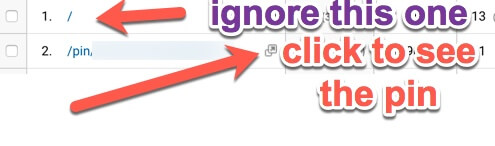 This will show you which pin it is.
Make sure that you grab that pin URL by highlighting it and pasting it into a notepad.
You’re going to want that URL for later.
Repeat This Process
I make it a point to go through and find my top 10 pins that are getting the most shares and repins.
Once you’ve taken the time to find the top 10 pins that are getting shared, it’s time to start promoting those pins on Pinterest.
How to Promote Your Most Popular Pins
I personally like to make a spreadsheet on Google Drive and keep track of my most popular pins.
After all, these are the pins that people have shown that they love.
They are the ones that are getting the most love on Pinterest.
It’s your job to keep that momentum going.
You need to keep putting these pins in front of your audience.
This is what I use Group Boards for.
I am currently a member of 10 group boards.
I’ve seen some bloggers say that they belong to 50 or more group boards.
If you’re completely new to group boards, here’s a great article that will explain them in depth.
It’s going to take some time to join group boards.
I know that it took me a long time to join the ones that I belong to.
The main thing is that you start reaching out and joining a few.
Should I Use A Scheduler?
I am a big fan of Tailwind and use it to help me automate my pinning.
There’s no way that I could write guest posts for Donna’s blog or focus on other promotional strategies if I spent all day pinning.
As you can see, Tailwind is set up and I have scheduled 26 pins today.
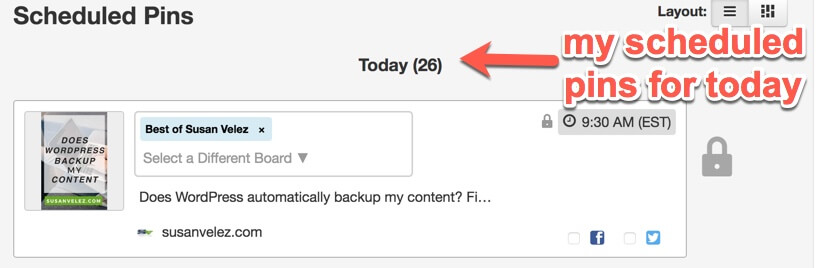
So yes, I recommend and use social media automation.
Now, I don’t let the scheduler pin everything.
I make it a point to schedule a few of my own pins and other people’s pins throughout the day.
I usually pin at night on my iPhone when I sit down to watch my Blue Bloods reruns on Netflix.
Should You Pin Manually?
I truly don’t know if pinning manually has helped me improve my blog traffic.
I can say that by logging into my Pinterest account on a daily basis, I was able to see that someone had stolen my pin.
If I hadn’t been logging into my account on a daily basis, I would have never found out about the stolen pin.
Keep Pinning Your Best Pins
While you don’t want to spam Pinterest or your Group Boards, you do want to keep getting your most popular pins out on Pinterest.
As you start paying better attention to your pins, you’ll start to notice that maybe 10-15 pins will be the ones bringing you the most traffic.
When I look at my popular pins, it’s sad to see that only a handful are the ones responsible for my blog growth.
Why weren’t all my pins successful?
- Maybe my pin wasn’t pretty enough?
- The image I used confused people?
- Maybe they didn’t like the font?
- The colors that I used for the font didn’t vibe with people?
- Maybe ____________ put your reason here.
I truly don’t know what it takes to create an awesome pin that people want to pin.
I’ve just been testing things out and seeing what works best.
As bloggers, that’s all we can do.
Test things out and see what works.
Once you find out what actually works, then you can run with it.
Create New Pins
Another thing that you can consider doing is creating some new pins based off of your popular pins.
As content marketers, we know the importance of piggybacking off of our popular posts.
Whenever we find a post that is already popular we write another blog post based on the same topic.
You should consider doing this for your popular pins.
They’ve already been proven to be successful.
Why not create another pin for it?
You could try changing up the keywords and see if the new pin can beat out the old pin.
I’ve found that there is tons of information related to Pinterest marketing.
The only thing you can do is get out there and test things for yourself.
It’s the only way that you’re going to find what actually works for you.
Unfortunately, there is no proven step by step system that you can follow to get the same results.
What works for me, may not necessarily work for you.
Give It Time
I know you’re probably thinking, how long does it take to see traffic from Pinterest?
I’ve been using the platform for about 8 months.
I’ve finally started seeing my Pinterest traffic pick up.
At times I felt like giving up because I figured what was the point.
I was pinning my content and other people’s content.
Yet, nothing, nada, no traffic just crickets.
However, I had heard so many bloggers talk about the power of Pinterest.
So I kept pinning without expecting anything in return.
While waiting for Pinterest traffic, I spent time commenting and guest posting.
After all, we all know how important it is to NOT put all your eggs in one basket.
It’s important to get blog traffic from more than one place.
Now, while I don’t get 100,000 page views per month, I have noticed that more of my pins are getting repinned.
I’ve even been approached by people to join their group boards.
Keep Pinning
Whatever you do, just keep pinning.
Be sure that you are pinning your most popular pins more often than you are your other content.
Always pin your new blog posts.
You never know if one of them will actually turn into one of your most popular pins on Pinterest.
Only time will tell.
Believe me, it does take time.
Don’t expect to pin something today and then start seeing a flood of traffic.
You might get lucky and have a pin go viral.
But that hasn’t been the case for me. Instead, I’ve experienced slow growth.
It does take a while to learn how to use Pinterest.
However, I do believe that it’s worth considering the fact that they’ve now crossed the 200th million active users.
If you can learn how to get your pins in front of just a fraction of those users, I have no doubt you’ll be sitting pretty 🙂
Learn More About Donna’s Popular Top Tier Coaching Program for Bloggers

Final Take Away
Learning how to grow on Pinterest is going to require you to get off your blog and get into the platform.
You can’t learn everything just by setting up your pins on an automated scheduler.
Spend time on the platform.
Find out what the popular pinners are doing and see if you can pick up some techniques.
Don’t be afraid to invest in your online business.
Sometimes it requires us to hire coaches or invest in products that can help cut our learning curve in half.
I’d rather spend money on my online education than spending years trying to figure out things on my own.
Let me know, are you using Pinterest for your blog?
If so what tips can you share with Donna’s readers?
Maybe I missed something that can help us improve our Pinterest marketing?
Please leave me a comment below, and share this article with your friends on your favorite social media sites.
About The Author

Susan Velez is helping new bloggers start, grow and monetize their passions through blogging.
She loves helping bloggers with the techie side of blogging.
Visit Susan on her blog (Susan Velez dot com) and follow her on Twitter @SusanWPTutorial.


Comments are closed.