
 So, just what are the best time-saving social media tools?
I see people struggle so hard to keep up appearances on their social media sites.
Everyone wants to be everywhere all the time.
In fact, it’s critical that you strive to meet that goal in order to build trust and credibility with your target audience.
And it’s equally critical to expand that core audience, and consistently put your blogging brand in front of a new crowd.
But it can all take so much time, right?
So, again… what are the best time-saving social media tools?
I’m pretty active on a few social media sites, but I’m not a big user of social media tools.
Yet, I know they are a really important aid to your blog or online business (so I should explore this more myself, no?).
Special: Join Donna’s Free VIP Blogging Club – Free Now… Free Forever
There are so many tools out there, though, that it can get really confusing.
So I asked Lilach Bullock, widely acclaimed blogger and social media expert, to share her thoughts on some of the best ways to go with this.
She’s done a wonderful job, and I’m sure you’ll learn a lot from her today.
What are the Best Time-Saving Social Media Tools?
by Lilach Bullock
Social media is effective when you’re consistent and post quality content regularly – whether it’s curated or original content.
In this blog post, I want to look at some of the top time-saving social media tools – and try to find out which one is the best.
Social media scheduling: the basics
Social media scheduling tools have grown and evolved a lot over recent years, introducing all kinds of features to help marketers, bloggers, and so on to make the most out of their social media presence – and, of course, also save time.
It’s not enough to just schedule a post for a time and day; you need to be able to:
- Create evergreen content queues
- Create content categories so that you can republish them on a loop, without having to do anything else yourself
- Visualize and plan your social media calendar
- Collaborate with team members
- Check your social media content analytics and best posting times
The most important features to me, except of course for basic scheduling tools, are evergreen content queues and categories.
Without these, I’d have to spend hours every week tweeting incessantly.
That is, if I even had the time to do that much.
With these features, I not only get to save time, but I also generate more traffic and leads from social media.
Because the truth is, it’s not enough to post something once, or to only post a few times a day, especially on Twitter.
If you want people to see your updates and take action, then you need to post them multiple times and quite often.
Following is an in-depth look at some of the most popular social media marketing and scheduling tools on the market:
- Agorapulse
- Buffer
- MeetEdgar
Agorapulse
Supported networks: Twitter, Facebook, Google+, LinkedIn, Instagram, YouTube
Agorapulse is a social media management tool.
But they have recently been adding more pro features to their publishing and scheduling side.
This makes it more similar to some tools that are focused solely on scheduling (and therefore, usually have more features than management tools).
So, basically, you might have started out paying for social media management features, but you’re also getting some very powerful scheduling features as well.
Here’s an overview of their main features:
- Social inbox for managing your social media accounts
- Monitoring features
- Publish and schedule content
- Collaboration tools for teams
- Analytics and reporting
- CRM tool for social audiences
Now, let’s take a deeper look at what exactly it can do in terms of scheduling social media updates.
First off, you can use it to publish and schedule updates to Twitter, Facebook, LinkedIn, Google+, and Instagram (on Instagram, you can prepare your updates on your desktop/phone and then get reminders for when you have to publish them).
Each social network has its own dashboard, where you can access the Social Inbox with your mentions, the monitoring tab, publishing, and analytics/reporting.
Once you click on the publishing tab, there are a few different options:
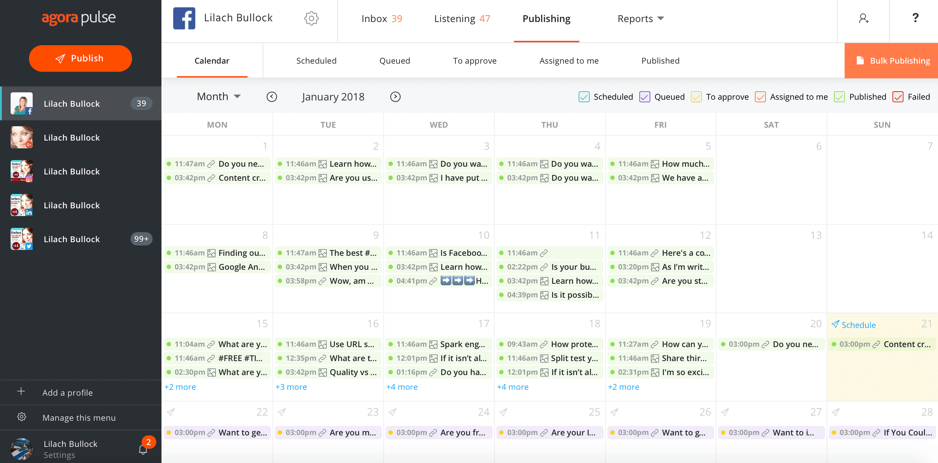
The Social Media Calendar
The social media calendar is where you can see your entire schedule for the month, to get a complete idea of your plan.
All items are color coded.
The list above the calendar shows you exactly what each color is, and can be easily filtered.
This is particularly useful if you have updates that are under review, or if you work as part of a team.
For example, if you want to only see the updates that were assigned to you, or the updates that are in the queue and those that are scheduled, you can do so by un-checking the other boxes.
To publish or schedule something, either click on the ‘publish now’ button, or click on ‘schedule’ on the day you want directly within the calendar:
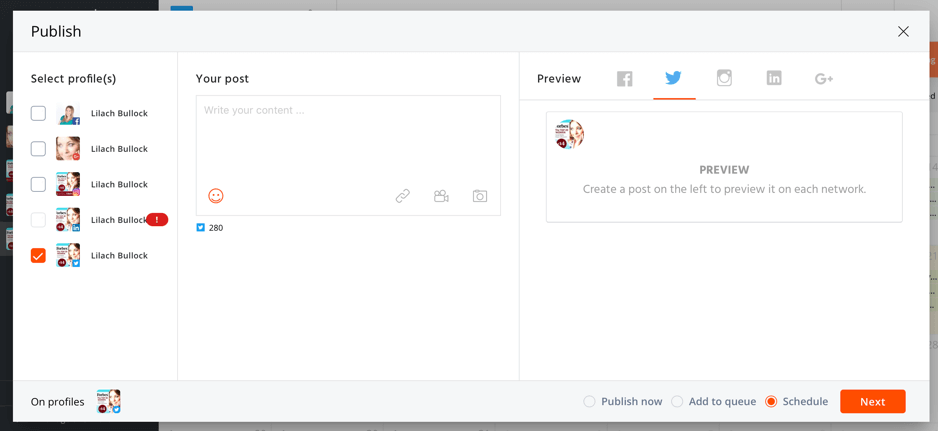
Multiple Social Media Profiles
You can select multiple social media profiles to post to and automatically see a preview of your post on each network.
That is useful as I can now see my image would not work on Instagram:
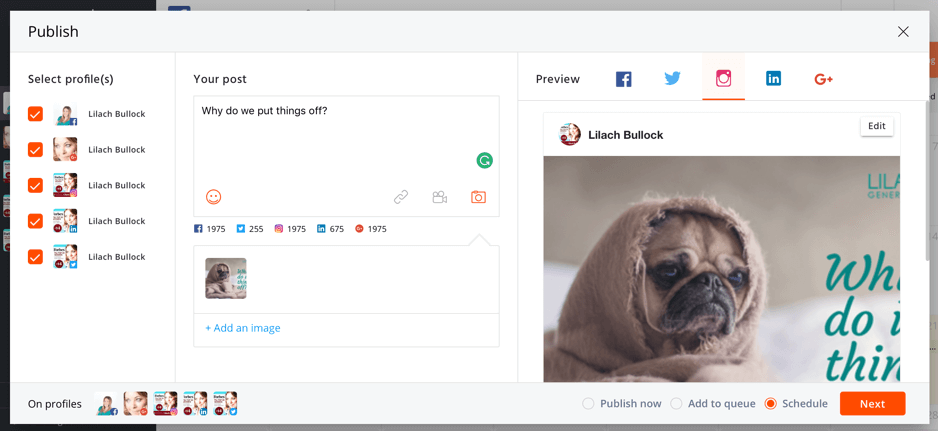
Additionally, on Facebook you can add the images you post to albums.
You can also target specific audiences (by languages or countries).
Posting Queue
Back to posting though, you have 3 options:
- Publish your post immediately
- Schedule your post for a specific time and date
- Add your post to a queue to be published numerous times automatically
This is probably my favorite feature – the queue:
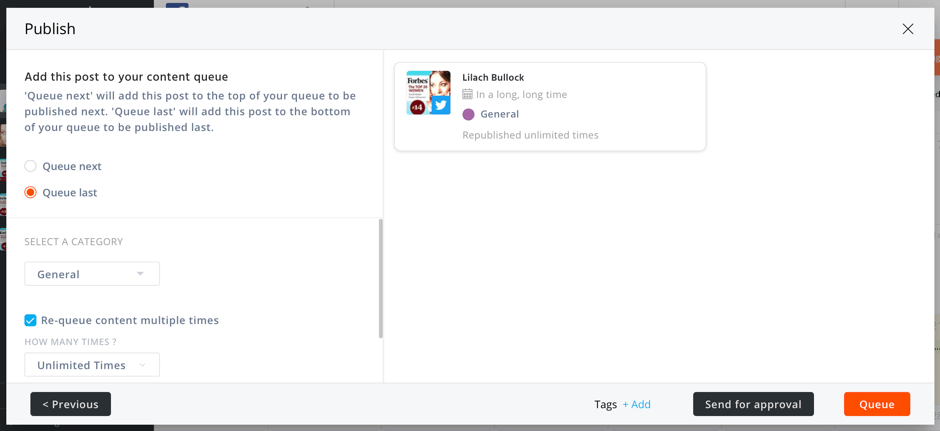
If you have any evergreen content to promote, or maybe an event coming up, this comes in very handy.
First, add your content to a category… promotional, general, blog posts, etc.
You can also tag your content, if you want to be even more organized.
Then, decide how many times you want it to be published.
Re-queque Content Multiple Times
You could make the update go out unlimited times, until you manually stop it.
Or, you could have it go out anywhere from 2 to 50 times.
And finally, you can have it go out multiple times, and stop completely on a date you set.
This is particularly useful for promotional events, new products, and so on.
This is the feature I was talking about earlier on, and praising its importance.
Queue Time Slots
As for when the posts in your queue go out, it’s up to you.
You can create specific time slots and select which content category will go out in each one:
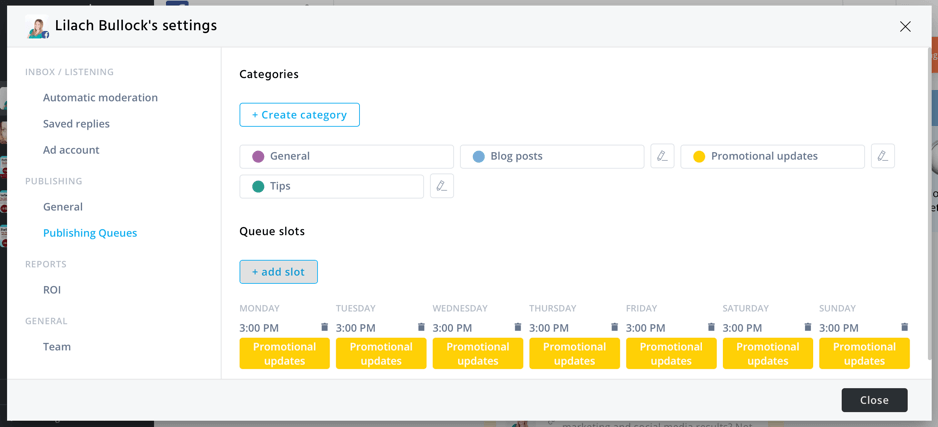
This way, you can just set your updates and forget about them – for a while, at least.
Scheduling via CSV File
Another way of uploading and scheduling updates is with a .csv file.
The updates can be scheduled or added to a queue:
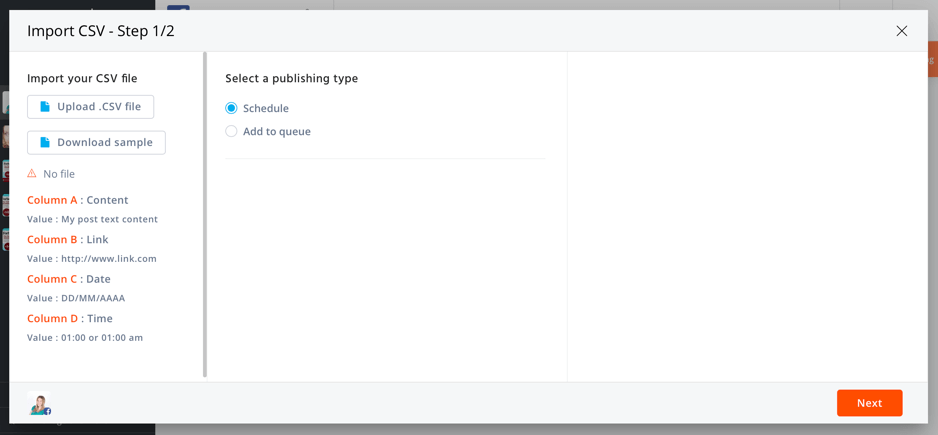
They explain exactly what your spreadsheet should look like, and you can even download a sample to make sure.
With many other similar tools, you still need to schedule the updates you upload in bulk.
But with Agorapulse, you can set up all of that within your spreadsheet, which is pretty cool.
Team Collaboration
Another useful and time-saving feature is the fact that you can collaborate with others on your social media.
Content can be assigned to any team member you want.
All updates can then be approved before they are scheduled or published, to avoid any blunders.
For ease, you’ll be able to quickly access assigned updates by your ‘assigned to me’ tab.
Or if you’re the editor, you can approve updates by going to the “to approve” tab.
Final Thoughts
What I love about Agorapulse is that you not only get all the main features that usually come with a pro scheduling tool, but you can also use it to manage your entire social media, including monitoring and analytics.
It has a very easy-to-use interface.
It’s quick, intuitive, and it’s all-in-one.
But most of all, it has those evergreen content categories that you can use to publish and republish as many updates as you want, as many times as you want.
Basically, you can create a whole years’ worth of updates and completely forget about them as they keep going out.
Special: Join Donna’s Free VIP Blogging Club – Free Now… Free Forever
MeetEdgar
Supported platforms: Twitter, Facebook, LinkedIn
MeetEdgar is a very simple tool.
It doesn’t have many features, but it’s a really good option for people who need to post a lot of updates on their social profiles.
MeetEdgar’s focus is to help you automate as much of your social media updating as possible, with minimal effort on your part.
Evergreen Content
Unlike most other social media scheduling tools on the market, MeetEdgar is all about the evergreen content.
It shares a few similarities with Agorapulse, in the sense that you:
- Create content categories where you add your updates (you can also upload in bulk with a .csv file)
- Add each category to the time slot you want in your social media calendar
When you add content to your queue, I like the fact that you can upload it for multiple social accounts.
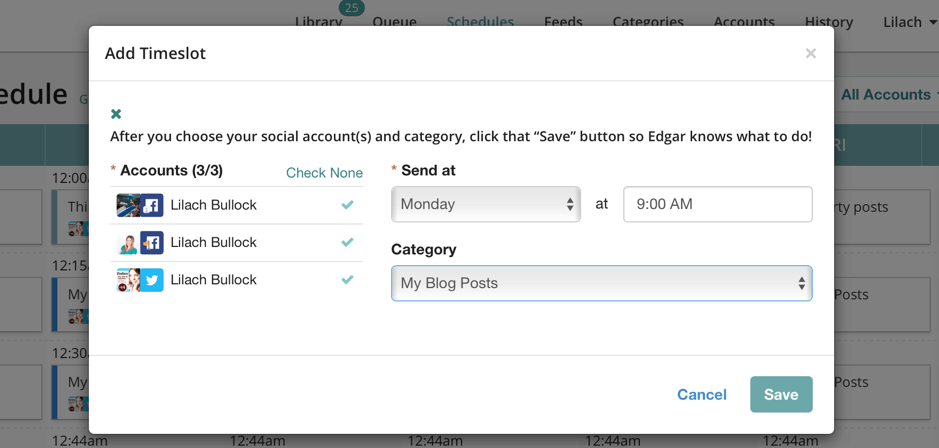
However, you can’t edit for each one to optimize the update.
The content you add to your content categories will be automatically added to the queue, so that it gets republished unlimited times.
However, if you don’t want that, you can change your setting:
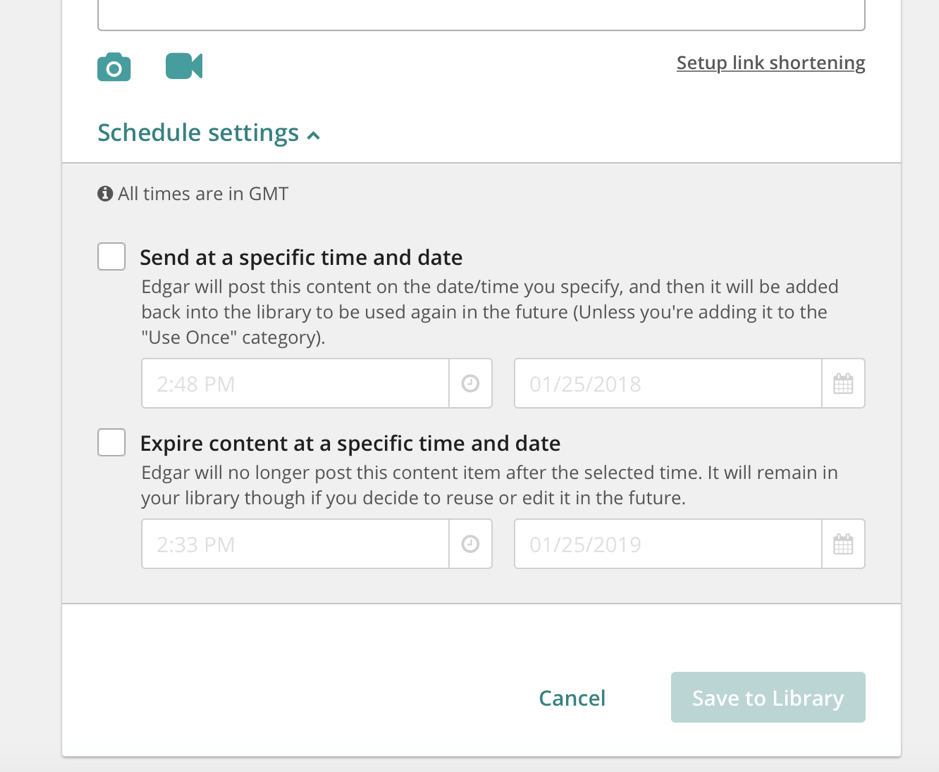
As you can see above, you can also send the update at a specific time and date.
But then it will be added back to the queue to be reused, unless you add it to the ‘use once’ category.
Or, you can set an expiration date for the update (time and date).
Curated Content
Another big feature is that you can curate content from your preferred sources automatically.
Just like with scheduling and queuing updates, this feature is all about involving your manual action as little as possible.
You just copy and paste the link to the publication you want and pick the channels you want to post on:
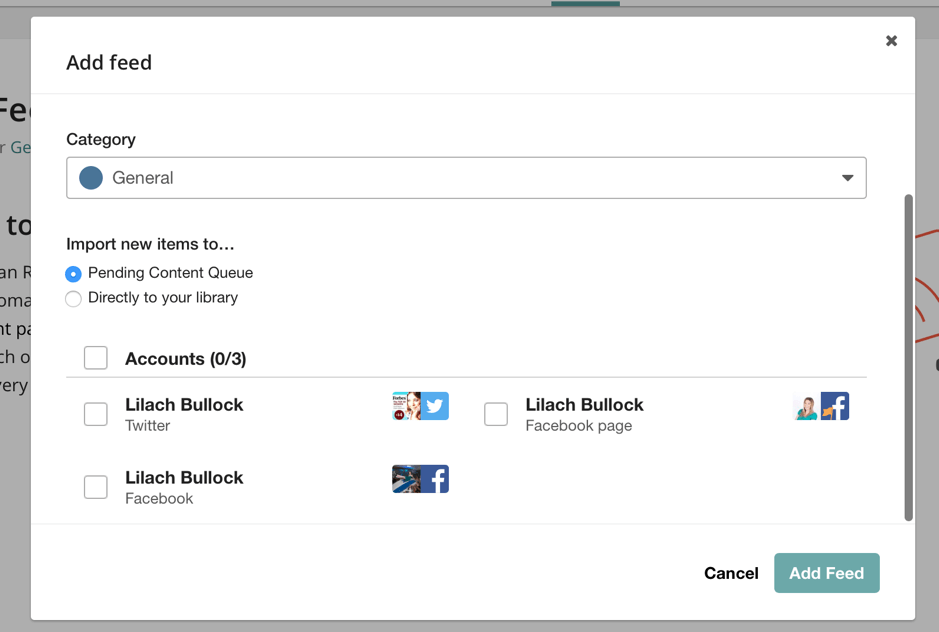
Once done, you can choose to import any new items from your feed to the pending content queue, or directly to your library.
Final Thoughts
Although it’s a great option for creating large evergreen content queues, MeetEdgar does lack quite a few features.
Additionally, it only works with 3 social networks.
It would be good to see
- collaboration tools for planning,
- some analytics (at least best times to post so you can add them to your time slots), and
- more supported social networks.
Special: Join Donna’s Free VIP Blogging Club – Free Now… Free Forever
Buffer
Supported platforms: Twitter, Facebook LinkedIn, Google+, Pinterest, Instagram
Buffer is a social media marketing tool for publishing and scheduling updates, as well as tracking your content’s performance.
Like Agorapulse earlier, Buffer allows you to collaborate with your team.
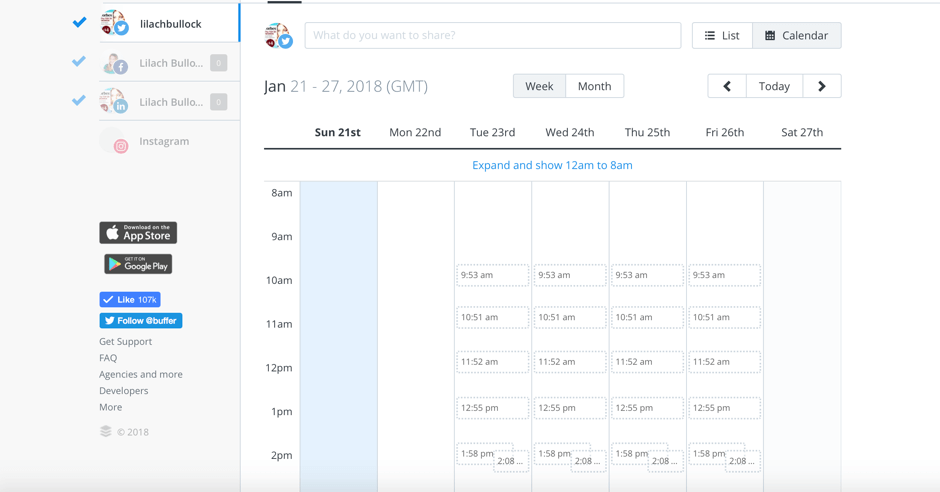
There are 2 ways to view your dashboard/queue of scheduled posts: either as a list or as a calendar:
Scheduling
To get started, you can begin by setting your posting times – i.e., the times when you want your updates to go out:
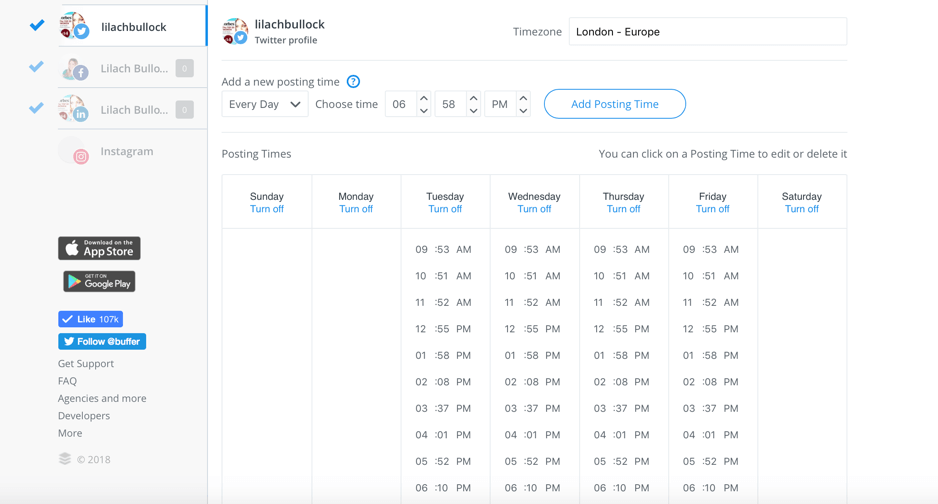
You can
- remove time slots,
- turn days completely off (no updates going out), and
- easily add time slots for every day, or only specific days.
Once you’ve set your time slots, you’ll be able to see the list/calendar with all of your available time slots, so you know when you need to add some content:
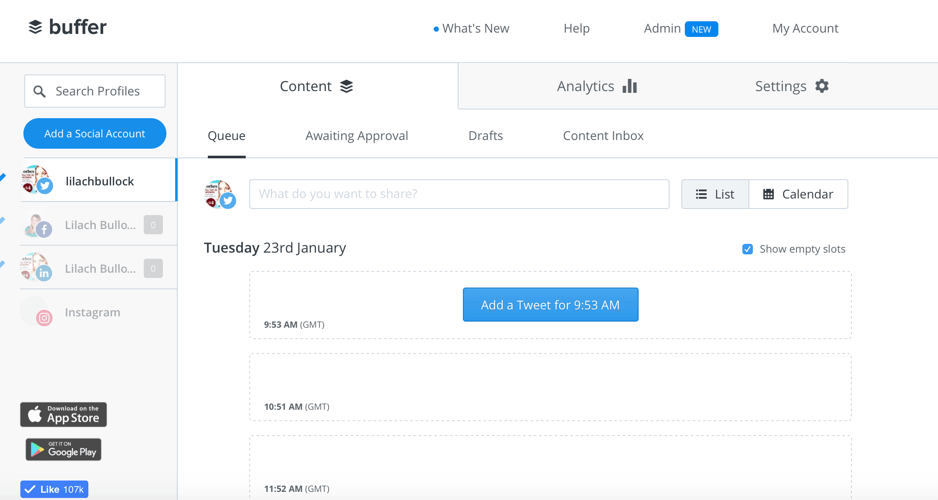
To add an update, just click on the available time slot:
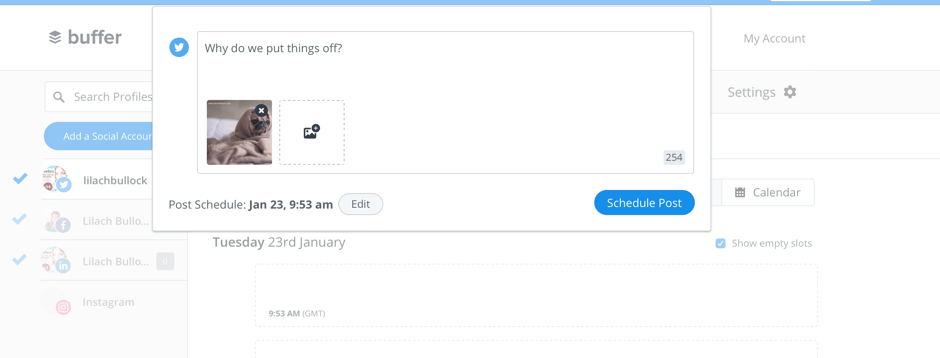
Upload images and videos, write your update, and schedule it.
You can also use your dashboard to plan your future updates and perfect them.
Go to the drafts section and add all of your update ideas, images, videos, and so on.
RSS Feed Integration
One of the standout features (at least, to me) is that you can add RSS feeds to your ‘content inbox.’
That way you can easily curate and share top content to your fans and followers.
You just have to add publications, websites, and blogs you like to your content inbox.
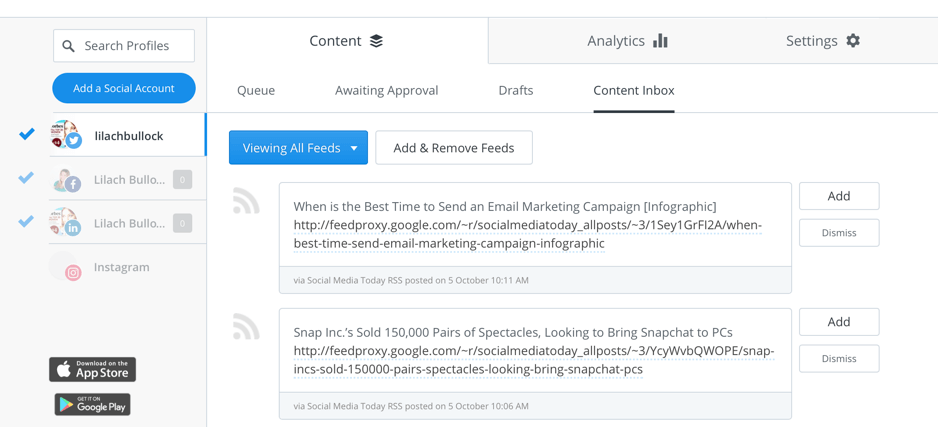
Buffer will automatically pull their latest content.
If you want to add a post to your queue, you just click on “add” and you’re good to go.
Buffer Drawbacks
As I mentioned earlier, Buffer also works with Instagram.
However, Buffer for Instagram only works on your phone.
To access it, you need to get the Buffer app for iOS or Android.
But while this does slow down the process a bit, it’s understandable considering you have to post via your phone anyway.
In terms of drawbacks though, Buffer does not offer content categories for setting up queues this way.
So you’ll need to stay on top of it constantly to keep posting updates.
Another drawback is that you can’t upload in bulk.
However, there is a 3rd party app that you can use for this.
Link Shortening and Tracking
When posting, you should also set up link shortening and tracking.
You can choose to post your links as they are and not have them tracked.
Or you can shorten your links by using
- Buffer’s buff.ly,
- bit.ly or
- j.mp.
When you shorten your links with one of these 3, your link results will be tracked.
Additionally, you can also connect with Google Analytics to further track your social media traffic.
Final thoughts
Buffer has a very clean and easy to use interface.
It’s quick to learn and great for those who have to manage multiple profiles.
However, as I mentioned earlier, it does lack some very important features.
Most notably, the fact that you cannot set up content categories and queue them up unlimited times.
What are the best time-saving social media tools?
The Verdict
These are all very good tools – which is why I’ve chosen them – with plenty of features and benefits in common.
Personally, I do believe that your specific needs should determine which one is the best option.
f you want something to help you completely manage your social media and also get pro scheduling, then Agorapulse is the best option.
If you want to keep your scheduling separate from managing mentions, monitoring, and so on, Buffer is the better option.
And, if you only want to schedule unlimited amounts of updates and have them go out automatically with no input from you, MeetEdgar might be the best option for you.
Have you tried any of these 3 tools?
Which do you prefer… and why?
Leave me an comment below and tell me what you think are the best time-saving social media tools.
About The Author

Lilach Bullock is highly regarded on the world speaker circuit, and isa hugely connected and highly influential entrepreneur.
She has graced Forbes and Number 10 Downing Street, and is listed in Forbes as one of the top 20 women social media power influencers.
Lilach was crowned the Social Influencer of Europe by Oracle, and is listed as the number one Influencer in the UK by Career Experts.
In addition, she is a recipient of a Global Women Champions Award for her outstanding contribution and leadership in business.



Comments are closed.