
 I want to share with you the Top 5 Highly Insightful WordPress SEO Techniques That Work Like A Charm.
Of course, you probably know by now that I’m not SEO expert, but hey, it’s still one of the greatest sources of free traffic, right?
I mean, at the end of the day, Search Engine Optimization (SEO) is all about getting free traffic to your site.
When you take advantage of things like the techniques you are about to learn, you are giving your site a great chance to get high Google ranking in the search results.
So, yea, it’s really a big deal.
And it’s something I can certainly improve on, too.
So I bought on an expert, my good friend Anil, to give you some top advice on WordPress SEO Techniques that can help you get a lot more free traffic through Google search.
So, now, I’ll turn the rest of this article over to him!
Top 5 Highly Insightful WordPress SEO Techniques That Work Like A Charm
by Anil Agarwal
Search engine optimization (SEO) is not just meant for online stores.
WordPress users and all kinds of bloggers should also learn the best SEO techniques in order to build a profitable blog that makes money in the long run.
Contrary to what most people think, SEO is not a rocket science.
SEO is a skill that can be learned by anyone.
Unfortunately, there’s a lot of SEO advice given by thousands of people worldwide.
This makes it confusing to find and implement the RIGHT SEO techniques to boost your search rankings.
This post is exclusively for you…
- if you’re struggling to get more search traffic, and if
- you are are looking for the most effective SEO techniques.
Let’s get started without further ado.
5 Most Powerful WordPress SEO Techniques to Try In 2018
1. Set the right foundation for more search traffic
The best part about WordPress is it is the most search engine friendly blogging platform.
That’s the reason it has become the #1 CMS (content management system) in the world.
It is used by big brands like BBC, TechCrunch, The New Yorker etc.
By default, WordPress doesn’t give full access to all the SEO friendly tools.
So you need to find and use the right tools to make your WordPress site optimized for SEO.
That being said, here are 3 essential things you need in order to set the right foundation for your WordPress site to attract more search traffic.
#1. Create an XML sitemap
An XML sitemap contains a list of all the URLs of a website. If you setup an XML sitemap for your WordPress site, it becomes easier for search engine crawlers to crawl and index all the important pages (URLs) of your site.
Here’s what it basically looks like…
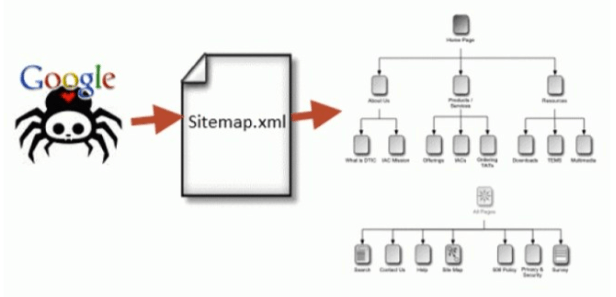 The above Image is from the article
How to Create an SEO-Boosting XML Sitemap in 20 Seconds (by Neil Patel, Neil Patel .com).
It includes greater detail about setting up an XML Sitemap.
You can easily create an XML sitemap using this WordPress plugin which is free.
Once you install and activate the plugin on your WordPress site, submit your sitemap from your website’s Google Search Console.
You’re done!
#2. Set up Google analytics
Do you want to find out who is visiting your WordPress website?
Do you want to know the location of your target audience who are browsing your website’s content?
You need to setup Google analytics and connect it to your website then.
If you’re using a plugin like WordPress SEO by Yoast, you can easily authenticate and connect your WordPress site to Google analytics.
You can also use Google analytics plugin to easily add Google Analytics tracking code to your WordPress website.
#3. Install WordPress SEO by Yoast
Do you want to optimize your blog posts for more search traffic?
Install WordPress SEO plugin then.
It’s one of the most downloaded plugins in the WordPress directory which helps you easily optimize your blog posts and pages for specific keywords.
Not only does this plugin help with on page optimization, but you can also use it for technical SEO configuration such as managing robots.txt, .htaccess file, canonical URLs and so on.
2. Learn how to find low competition keywords
Keyword research is one of the biggest factors that can make or break your website’s success.
If you really want to attract more search traffic to your WordPress sites, you should target the right keywords that people are searching for.
When it comes to keyword research, most people make a mistake of targeting broad keywords which have huge competition or monthly search volume.
The #1 way to bring more search traffic is to find keywords with low competition.
Make sure to use LSI keywords
LSI (Latent Semantic Indexing) keywords are basically keywords that are semantically related to your primary keyword.
These LSI keywords can easily be found on Google at the bottom of the page when you search for something.
For a better understanding, look at the following image to see the LSI keywords that were populated when I did a Google search for “how to apply foundation.”

As you can see from the above screenshot, you can find a ton of LSI keywords which are semantically related to the primary keyword you search on Google right at the bottom of the page on any Google search you do.
If you are still wondering about why you need to target LSI keywords while creating content, here are some of the benefits.
- You can easily optimize your content without keyword stuffing
- LSI keywords help Google and other search engines to easily understand what your content is all about
- You can drive more visitors from search engines by using multiple LSI keywords which are relevant to your primary keyword
- They also help you attract the RIGHT visitors who are interested in buying stuff from you
So what are you waiting for?
Start using LSI keywords within your content today.
As discussed above, you can use Google or you can also use tools like LSI Graph to easily find a ton of highly relevant LSI keywords to increase your search traffic.
That being said, here are few tips you can use while doing keyword research for your WordPress sites.
Start using keyword research tools
You can start with Google’s Keyword Planner.
It is a free tool for finding keywords no matter what industry you are in.
And, it also gives you valuable information such as…
- CPC (cost per click)
- Monthly search volume
- Related keywords and so on
Besides Keyword Planner from Google, for beginners who are looking for free keyword research tools, here are few more effective ones…
But if you want to get accurate data of your keywords, you should get access to premium SEO tools like SEMrush, Ahrefs and others.
They provide you with
- highly profitable keywords
- accurate keyword data
- competitor analysis
Focus on finding long tail keywords
A long tail keyword usually consists of 3 or more keywords.
For instance, “best laptops for writers” is a 4 word long tail keyword which you can target within your content to get higher rankings on Google easily.
The best way you can increase your WordPress search traffic through your content is to use long tail keywords and write in-depth content.
Did you know that 2000+ word blog posts perform far better in search engines when compared to average 500 word blog posts?
So, if you’re struggling to increase your organic traffic.
- create long form of content, and
- target long tail keywords with every blog post you write.
Find keywords with moderate monthly search volume
Another important thing to remember while doing keyword research is to focus on finding the keywords with moderate to less monthly search volume.
This helps you get first page rankings with minimal efforts.
As a rule of thumb, make sure to focus on finding those keywords with monthly search volumes below 500 searches.
This will enable you to get better rankings even if you have a new website.
3. Make your WordPress site lightning fast
Everyone loves faster websites.
But only a few WordPress users take their site’s speed seriously.
Not only your visitors, but also Google gives top priority to the sites that load faster.
If you don’t focus on increasing your site’s speed and performance, you’ll hate yourself later.
That being said, increasing your WordPress site’s speed is not a big deal as you can easily increase your WordPress site speed by
- Optimizing images on your site
- Hosting your site on faster web hosting servers
- Installing CDN
Here are few more tips if you want to increase your WordPress site’s speed.
Limit your blog post revisions
Whether you know it or not, WordPress saves all of your post revisions.
That way, you can always go back to an earlier version of the post.
And you can restore them any given time.
But it creates a lot of burden on your databases if you have a habit of making too many changes while creating blog posts.
The best way to reduce the burden on your databases is to limit your blog post revisions.
You can either control them manually or you can simply install Revision Control plugin to easily put a limit on post revisions.
Add LazyLoad to your images
Do you use a lot of images and screenshots while creating blog posts?
If yes, you should make your images lazy load.
Lazy loading helps you load your images only as the user scrolls down the pages on your site.
This reduces http requests performed on images, hence you can attain faster loading times.
You can use a plugin like BJ Lazy Load in order to perform lazy loading to your images.
Use a caching plugin
If you’re a WordPress user, you should definitely use a caching plugin such as W3 total cache or WP Super cache.
These help you easily optimize your WordPress site for speed and performance.
Optimize your WordPress database
WordPress saves a lot of unwanted data within your databases such as trashed, unapproved, spam comments, pingbacks, trackbacks and so on.
All this unwanted data creates more burden on your databases which ultimately effects your website’s speed.
So optimize your WordPress databases.
You can use plugins like WP Optimize in order to increase the overall performance and speed of your WordPress site.
4. Go mobile
The simplest way to turn your WordPress site user-friendly and search-friendly is to make it mobile responsive.
Use Google’s Mobile-Friendly Test to find out how optimized your website design is for mobile and desktop usage.
This is what it looks like…

Here are some of the main reasons that it’s so important to have a mobile responsive WordPress website.
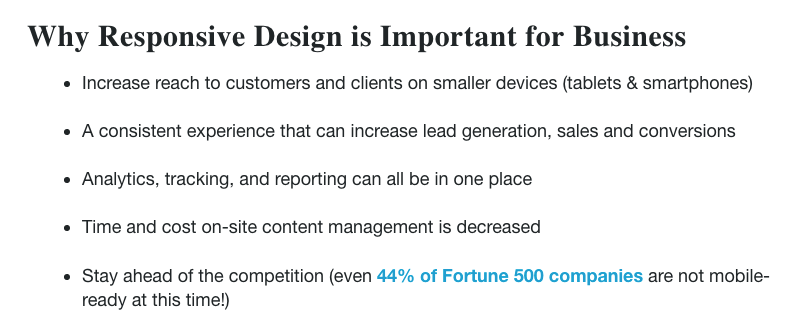
The above excerpt is from Why Responsive Design is Important and Google Approved
(by Sonia Gregory, Freshsparks .com, updated May 22, 2018)
So make sure to use a mobile-friendly design if you want to increase your search traffic and rankings.
Either you can buy a responsive WordPress theme or hire someone to make your site mobile-friendly.
Pro tip: For WordPress users, there’s an incredible and easy to setup plugin called WPTouch which helps you easily create a mobile version of your website.
5. Conduct an SEO audit for your WordPress site
Are you struggling with website traffic even after creating quality content?
Maybe it’s the right time for you to perform an in-depth site audit of your site to find out all the issues and errors your site has.
There are so many tools such as Seomator available for conducting SEO audits of your WordPress site.
With Seomator, you can easily find all the technical issues your site has.
These could include such things as broken links, lengthy titles, duplicate content and so on.
Make sure to carefully analyze the following things while performing an audit of your WordPress website.
- Robots.txt analysis
- Sitemap analysis
- Broken links analysis
- Check for images without alt tags
- Check for blog posts without meta description or title tags
- Mobile friendly analysis
- Website speed test and performance
Also, make sure to find out if any pages on your website have restricted indexing from Google search.
You can get all this information by performing a detailed site audit of your WordPress site.
You can also use tools like SEMrush which gives you a full site audit along with your site’s score.
In that way, you can easily find and fix all your website’s technical and SEO related issues.
Conclusion about the top WordPress SEO techniques for 2018
Most WordPress users think that SEO is hard but it’s not true.
In fact, WordPress users can get access to a lot of tools, themes and plugins to easily make their sites search engine friendly.
So what are your thoughts about the WordPress SEO techniques I’ve discussed above?
Do you have any more tips to share?
Leave your thoughts in the comments section below and please, share this article on your social sites.
About The Author
 Anil Agarwal is the guy behind Bloggers Passion blog where he is helping newbie as well experienced bloggers in taking their blog’s search traffic & revenue to the next level. You can connect him on Facebook here.


Comments are closed.