
Do you know how to do live video and meetings?
Maybe you thought it wasn’t important to know.
But if you have a business online or offline, live video and meetings are powerful.
They are powerful ways to meet new prospects and customers.
And they are excellent for connecting with teammates, co-workers and staff.
But they are pretty much essential to deploy in an emergency.
Now, emergencies happen for many reasons.
The current world-wide virus battle is just one example, but it is certainly a compelling one.
Companies have to shut their doors, cancel meetings, conferences and travel.
We can all see that from this current crisis, that are a lot of businesses that have had to close their doors to business as usual.
They can’t have meetings, they can’t talk to their customers, they can’t even talk to each other in many cases.
What are you to do?
Well fortunately the internet has a solution for us.
You can do all these things with live video and meetings, and even presentations.
But how do you do that?
Especially if you haven’t been doing it already.
Well, the good news is that there is way.
And I’ll show you a quick and easy way so you can get started today.
So let’s do this.
Establish a social media presence
The first thing you really need to do is establish some kind of social media presence.
That doesn’t mean that you have to have a robust social media activity flow.
And it does not mean that you have to stop and wait to build an audience or a following.
It only means that you need to have some social media account open that you can use to do live video and meetings from.
Now, you don’t absolutely have to have a social media presence to do live meetings.
You can do them from private platforms.
But social media is the fastest, easiest and most effective method to use.
Just open a social media account or use the one that you already have.
Now, almost everybody has a Facebook account.
So I suggest that you start there.
Facebook is definitely the best, easiest and fastest way to do live video and meetings and presentations.
Better news even… it’s free.
Blogging
In addition to social media platforms, you can also do live video and meetings right on your blog.
If you have a blog up and running then you can live stream to it.
This is a particularly good way to do private and small group meetings.
If you don’t have a blog yet, you could set one up very quickly.
In a day.
It’s not like the old days where it takes weeks for designing and programming.
Just about anybody could start a blog in a day.
If your business doesn’t have a blog, it’s a good idea to start one.
Not only for an emergency or for a crisis.
But just for the long-term growth of your business.
There’s really no better way to keep in touch with your audience than through blogging.
It makes you the authority figure.
And it puts you in charge.
At the same time, it makes you the ultimate source of information and expertise.
And yes, you can do your live video presentations right on your blog.
That makes it exclusive to whoever you may want to invite.
How to do live video and meetings
So how do you actually do live video and meetings?
Where do you go?
What kind of equipment do you need?
How about lighting and all that?
Well, yes, it can get complicated.
But I’m going to make this very simple.
If you’re in an emergency situation and you’ve never done this before… then you just want to keep your business rolling, right?
Facebook Live is the fastest and easiest way to do live video and meetings.
So I suggest you get started there right away.
Again, if you don’t have a Facebook account, open one now.
You can do this as an individual.
But if you have a business, the best thing you can do is open a Business Facebook Page.
And if you want to address a very specific audience, I highly recommend you open a Facebook Group for that purpose.
FB Live – public
To do live video and meetings with Facebook Live, all you have to do is go to your Facebook timeline and start a status update.
But instead of texting, just click the link that shows video.
From there, click the link that indicates live video.
I’ll show you what this looks like today…
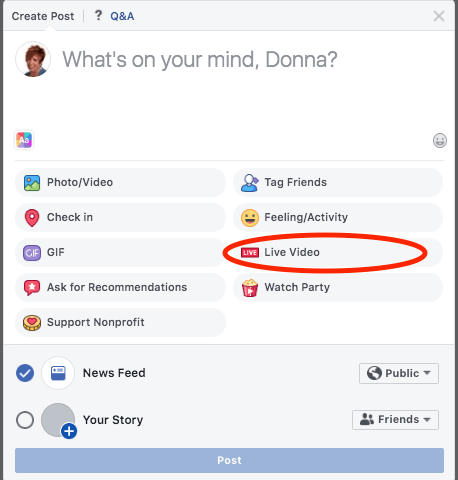
Just keep in mind that things change all the time on Facebook, so it may look different for you.
The point is this.
If you start a live status update, you will have an option to do a video.
And from there, you will have an option to do a live video.
Now, all you have to do is
- sit in front of your webcam
- hit the go-live button and
- start talking to your audience.
It’s really that simple.
That’s why I say that this is a simple and fast way to do it.
This is your best bet if you come across any emergency where you just can’t open the doors to your business or class.
Or if you can’t have meetings, or you can’t attend meetings, or you can’t give presentations like you normally would in person.
You are going to find this is so easy and so powerful that you’ll probably want to do it as a matter of routine, and not just during an emergency.
Variety of live videos
From your timeline, you’ll be doing a live video that everybody can see.
You can save your videos and embed them on your blog, in an email or anywhere you like.
Fast and easy you are now reaching as many people as you want when you do live video and meetings.
If you have a Facebook Page dedicated to your business, you can do these live presentations on your Facebook Page instead of on your personal timeline.
That way, only people that are your business followers will see your live video.
Your friends and family or anybody else won’t see them on your timeline.
But when you’re first getting started, it’s a good idea to do your live video and meetings from your timeline.
And simply refer people over to your business page from there.
Then you can share that live video on your business page, too.
Eventually, people get used to seeing you on your business page and you can stop doing them on your timeline if you wish.
FB Live – private
Now if you want to do live video and meetings privately, the best thing to do is start a Facebook Group.
So if you have a Facebook group for your business, for instance, then only people that you invite to it will see your video.
You can make your Facebook Group a private group by requiring that people ask permission to join it.
And you only admit people that you want to be in your group.
This is ideal if you want only other people in your company, for example, to see your presentations.
Simply start a Facebook Group and only invite people from your company to join.
And then, when people ask permission to join, verify that they are part of your company before approving them.
Then when you do a Facebook live, you can do it from inside of that group.
Only approved members of that group will see your live video and meetings.
You can have a private meeting in this way.
Tell everybody to meet you there at a specific time.
People can watch your video.
But they can also have conversations with you via the comments section.
You can do Q&A or anything else you like to do from within that platform.
Again, these will be recorded by default.
You can then put them in your emails that you send out privately to people.
This is good, for instance, for people that could not attend live.
How to do live video and meetings in an emergency
So this is a quick and easy way to get your business going live.
Doing live video and meetings can keep you afloat when you cannot do business in person.
But you will soon find that it can also help you build your business in more ways than you can imagine.
Do you think this will help you move your business forward in times of emergency?
Let me know what you think of doing live video and meetings.
Leave me a comment below.
–Donna
PS:
Please share this article on your social sites, too.
Thanks so much!


Comments are closed.