
 Learn how to make the first video for your blog to give it some life and personality.
The most important thing to do on your blog is to establish a unique voice.  That’s what makes you stand out from all the other bloggers.
The problem is, when you blog about the same things other people blog about, how can you do it in a unique voice.
Video is the answer.
There can be a million blogs about how to play golf, for instance.
But only you can use your own voice to blog about playing golf.
It’s just so hard to do that in writing.
Yet, it’s easy as can be when you do it with video.
What’s so important about making the first video for your blog?
Many bloggers never put videos on their blogs.
So why do I make such a big deal about it?
Well, there’s a few reasons.
Building your blogging skills
When you learn how to make the first video, you’ll be developing an invaluable blogging skill.
Not many bloggers get to the point of being comfortable with video.
Even fewer bloggers post videos on a regular basis.
Special: Join Donna’s Free VIP Blogging Club – Free Now… Free Forever
They are really missing out on a powerful blogging tool.
Develop the skill now, and your blog will benefit every day from it.
People see what YOU are about
The biggest reason to make the first video for your blog is to introduce yourself to your readers.
When you get new visitors to your blog, the first thing they want to know is who you are, and how you are different than all the other bloggers in your niche.
For that reason, I suggest that the first video you make should be for your About Me page.
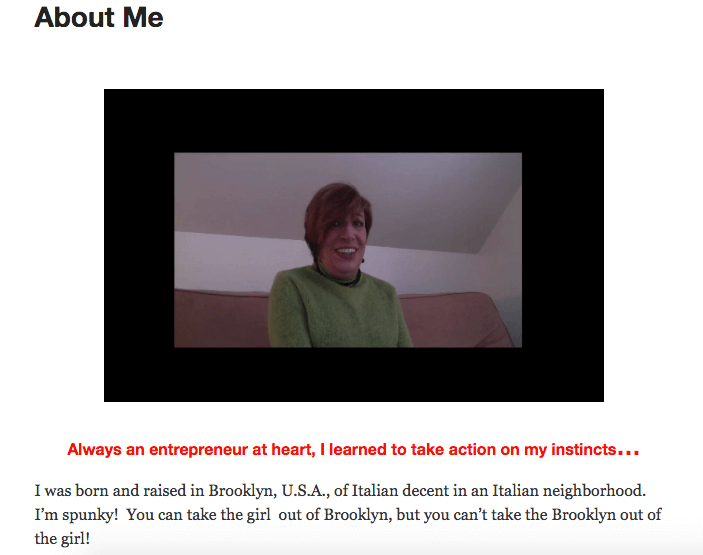
Now, I’ve had my About Me page video posted for several years, now.
I’ve thought of cleaning it up and making it more professional.
But I don’t.
You know why?
Because almost every day I hear from somebody who tells me how refreshing it is to see somebody doing a “real person” video.
They always see those polished, star-quality videos.
But what most people want from a blogger is someone real.
Someone they can relate to.
Don’t be afraid that your video is not “professional.”
It’s better if it’s not.
It starts the momentum
Once you make your first video and post it to your blog, you’ll start putting things in motion.
The hard part is making that first video.
Then you’ll build a momentum.
You can do another one next week.
Maybe you’ll decide you want to put a video up once a week on YouTube.
Or you might want to start doing live video every day on Facebook.
Wherever you let your momentum lead you, here’s the thing…
With video, you can easily start branding yourself as an authority in your niche, and as an interesting, worthwhile person to follow.
 It makes you a real person, not just some boring blogger who spouts out a bunch of information without putting their heart and soul into it.
How do you make the first video for your blog?
A lot of things can go into making a video.
There are lots of programs and services to get this done.
But I don’t want to focus on overly technical programs or expensive services.
Let’s keep this simple and stick to the basics.
That’s how you actually make things happen instead of getting all caught up on how difficult it is to do.
Get over the fear
The first thing you need to do is to get over the fear of making your first video.
It’s not hard, you only think it is.
Don’t be afraid of what you sound like or look like.
My first videos were truly atrocious.
So what.
Build “Content Upgrades” + “Landing Pages” Into Your Blog Posts, Seamlessly & Fast
I just kept doing them until they got better.
And they did.
Do something besides a face to camera video
If you’re afraid to be on camera, then don’t be.
“Face to camera” videos are the most personal and engaging.
That’s because you just let yourself be who you are.
There’s an endearing honesty to that kind of video.
Your readers and followers will love to see it.
But it’s not necessary.
Special: Join Donna’s Free VIP Blogging Club – Free Now… Free Forever
There are lots of types of videos you can use to build your brand and reputation as a blogger.
“Face to camera” is only one option, even if it is the best one.
Screen capture
Screen capture video is just what it sounds like.
Do something on your computer, and record it as you do.
So, maybe for your About Me page, instead of going “face to camera,” you try something like this.
Open your blog up on your browser.
Scroll around and talk to people about different features of your blog.
Show them how to find different categories of blog posts that you’ve published, or how to find your “Contact Me” page.
Talk about why you blog, how often you post or whatever you think is important for them to know.
As you do this, have your screen capture software open.
It will record everything you show on your screen, as well as your audio narrative.
When you are done, you’ll have a video on your desktop.
Easy, right?
Now, just do a little Google search for screen capture software and pick one that works for you and for your computer.
I work on MAC and use ScreenFlow.
I love it.
But there are other options, so look around.
Pick one.
Get started.
Just do it.
Home-made whiteboard
Whiteboard videos can be really easy to do for your first video.
Now, I’m not talking about the high-tech animated type of whiteboard videos.
I’m talking about a simple, home-made version that anyone can do.
Here’s how.
Open a blank document in whatever program you use for that.
It might be Microsoft Word, or even, like I use… Notepad.
Now turn on your screen capture software.
Begin your “talk” by explaining something.
Special: Join Donna’s Free VIP Blogging Club – Free Now… Free Forever
Let’s say you are going to show your readers how to write a sales letter.
So you begin your narration, and then just start typing notes on your word document.
Imagine that you’re a teacher at a blackboard.
As you talk, jot things down on your word document like you would if it were a chalk board.
So for instance, you might be explaining how it’s important to include a list of benefits in your sales page.
You could type on the document…
List of Benefits.
- What problems does your product solve?
- What is the #1 problem it solves?
- #2 benefit?
- #3 benefit?
- etc.
So you’re just giving people an outline to follow as you narrate your “video.”
By typing things on a word document as you speak, your audience gets visual confirmation of what they are hearing.
And they get a working outline to help them follow along, and refer to later.
These are all the same reasons that teachers write things on a chalk board, instead of simply giving a lecture.
And it’s an easy-as-pie way to create your first video, isn’t it?
Smart phone videos
Now, if you just want to do really casual videos, you can simply open your smart phone and shoot your video.
Of course, you can be face to camera, which is the most common use of smart phone video.
But you don’t have to be.
You can also focus your camera lens on a garden, a lake, a street scene… anything that shows people where you are.
Then you talk.
Your camera will capture whatever you’re pointing the lens at, while it records your voice.
Walk with me
Smart phone videos are great because they give people the sense of simply being with you.
Shoot a video while you’re at a restaurant, walking in the park… anything at all.
You’re telling your audience “Hey, walk with me while I explain something to you.”
Use your imagination.
Build “Content Upgrades” + “Landing Pages” Into Your Blog Posts, Seamlessly & Fast
Your video can be about anything that will help get your blog visitors to engage with you.
They’ll feel like they’re right with you as you talk to them conversationally about your topic.
Story time
You can also use smart phone videos to tell stories.
So, for instance, let’s say your blog is about personal development.
You might tell the story about how somebody you know overcame some big challenge in their life.
Maybe they lost a lot of weight, or won a race, or earned an award.
You could then interview that person with your smart phone camera to illustrate various personal development principles.
Facebook Live
My favorite use of video is Facebook Live.
You can teach people something, or do an open Q&A session or anything else you can think of.
Do it live, with your phone camera, right on Facebook Live.
This really builds relationships with people because they are with you “live” as you do your presentation or talk.
They can ask questions, live.
You can respond, live.
After your session is over, just grab the Facebook Live link and you have your video.
That’s right.
Just like that.
You just made the first video for your blog.
 Build an audience the easy way when you make the first video for your blog
When you go through the effort of learning how to make the first video for your blog, you will see that’s it’s really easy.
And fun.
Meanwhile, it will help you build a more engaged audience for your blog.
And it will even help you get top prospects, customers and clients.
And, once you’ve done the first video for your blog, you’ll be anxious to do the next one… and the next.
Develop a schedule for making your videos.
Make sure your readers are regularly treated to seeing and hearing you on your videos.
They’ll start feeling like they know you.
And they’ll become long-time loyal readers and customers.

Have you published any videos on your blog, yet?
If so, then keep going.
You’re on the right path to building your own great audience.
If not, then I hope I’ve made it easy for you to get started.
And I hope I’ve inspired you to do it sooner rather than later.
So now, have I given you some ideas for different kinds of videos you can do without a lot of hassle?
If this is all new for you… have you learned how to make the first video for your blog?
Leave me a comment below, and please, share this article on your social sites.
Thanks so much 🙂
-Donna


Comments are closed.